Menu bar manager · macOS 14+

Hide half your menu bar. Type a name to get any of it back.

Halo pushes the status items you never click past the edge of the screen, then keeps a searchable index of all of them, including the ones sitting under the camera housing. Hidden items slide back out for four seconds when something changes. Accessibility permission, nothing else.

14 days, no card. One key covers 3 Macs. Keeps working offline for a month at a time.

Five items tucked behind one divider.

Accessibility onlyNever Screen Recording
No accountA key, activated once. Works offline for 30 days at a stretch
Tracked by identityNot by x-coordinate
$15 once3 Macs, 2 years of updates

Why it exists

In 2024 the obvious choice stopped being obvious.

Three apps own this category. Here is where each one stands, put as fairly as I can put it.

Bartender changed hands in 2024

New owner, announced after the fact, and the first release under it added Profile Sync, which puts your menu bar layout in someone else's cloud. Bartender is still good at hiding icons. A lot of people decided they would rather not find out what the next release adds.

Ice ran out of maintainer

Ice was the free answer and a well-built one. Commits have mostly stopped, Ice Bar crashes on Tahoe, and a fork called IceMelt is carrying the project. Free and unmaintained is still free.

Apple's version is a checklist

macOS can hide some menu bar items in System Settings. You set the list once and that is the feature: no auto-hide, no rules, no search, no idea what the notch is covering, and Control Center cannot be hidden at all.

Where Halo starts

Managers lose items because they track them by position on screen. Halo fingerprints each item by owning bundle, accessibility title and ordinal, then resolves that fingerprint again after every layout event. Hiding is only safe if you can always get the thing back, so there are two ways back: type the name, or wait for the item to change and come out by itself.

The hiding trick is the same one Bartender and Ice use. Halo keeps its own dividers in the bar and stretches one until everything to its left is past the screen edge. What is different is the verify-and-retry loop around every move, so a failed drag never leaves you holding half a layout.


Ten things

Ten things the other four do not do.

One picture each. Keep scrolling.

01

Items are tracked by identity, not by x-coordinate

Halo fingerprints each item by owning bundle, accessibility title and ordinal. After a display change or an OS reorder it looks the fingerprint up again instead of trusting a position.

Plug in a monitor and nothing goes missing.

02

One hotkey lists every item and opens its menu

⇧⌘Space opens a palette holding every status item on the bar, visible, hidden or behind the housing, with fuzzy search. Press return and that item's own menu drops down where it normally would.

You stop clicking icons to find out which one is Docker.

03

Hidden items come out on their own when they change

Halo puts an accessibility observer on every hidden item and watches its title and value. Battery at 10%, Dropbox syncing, VPN dropped, Time Machine running: the item slides out for four seconds and tucks back.

This is the part that makes hiding feel safe.

04

It knows which items the notch is covering

Halo reads the housing rectangle for each display and the width of the frontmost app's menu titles, then marks every item that lands inside either. macOS reports those items as visible, which is how you end up clicking dead space.

Items hidden by accident can move into the Tray by themselves.

05

The Tray is a second bar that hangs out of the notch

A floating glass panel that springs down from under the housing, or off the right edge of the bar on an external display. Tiles are drawn from the app icon and the accessibility title, never from pixels.

Nothing is captured, which is why no capture permission is needed.

06

Layouts switch themselves when you dock

Save an arrangement per display set, per Space, per Focus mode: laptop only, docked with two monitors, projector. Halo keys each one to the sorted display serial numbers and swaps when the set changes.

One bar for the desk, a shorter one for the train.

07

Rules are sentences with the blanks filled in

Show 1Password while Safari is frontmost. Hide everything when a screen recorder starts, using triggers for frontmost app, power, network, Bluetooth device, display count, time window, calendar event, item value and Focus mode.

No condition builder, no tree of ANDs to debug.

08

Any item can have its own hotkey

Give an item a key and pressing it opens that item's menu, wherever the item happens to be sitting. Shortcuts actions, a halo:// URL scheme and a halo command cover the rest.

⌥⌘B for Battery, without aiming at a 22-point target.

09

Groups have names and they collapse

Call a group Work, System or Dev, give it a label chip, and drag items between groups inside the Tray. macOS gives you command-drag and no labels at all.

The Tray reads like a shelf instead of a row of guesses.

10

Hidden items can live in the Eclipse notch card

If Eclipse is installed, Halo publishes the hidden set to it as one more tab. Same hover, same panel, same hotkey.

One gesture covers both apps.

The app itself

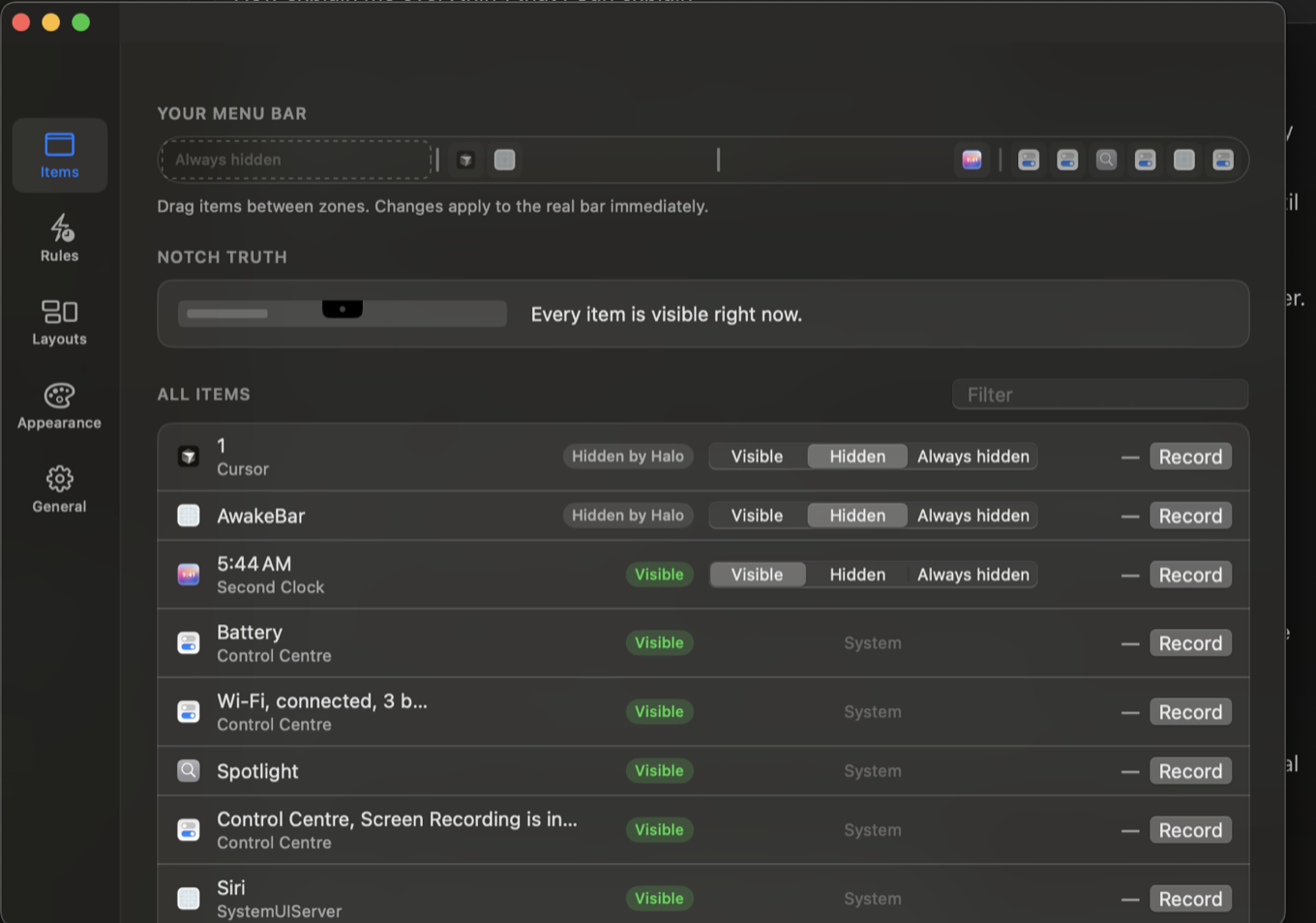
One window, and the top of it is your actual menu bar.

The replica is 1:1 and live. Drag an item between zones and the real bar moves under your cursor. Below it sits the notch-truth line, then every item with the process that owns it and what Halo is doing to it right now. There is no separate visible list and hidden list to keep in sync.

Halo settings: a replica of the menu bar with an always-hidden zone, the notch truth line reading every item is visible right now, and a list of items with their owning process and visibility.
Halo on macOS 15. A build in progress, not a mockup.

Compare

Row by row, against the other four.

Checked in September 2026 against the shipping versions. If a row goes stale, mail me and I will fix it.

  Halo Bartender 5 Ice Lounge macOS built-in
Notch-aware Tray Yes Bar, not notch-aware Ice Bar, crashes on Tahoe Yes No
Search every item by name Yes No No No No
Hidden items peek on change Yes Yes, via Screen Recording No No No
Rules Ten triggers Triggers No No No
Per-context layouts Display, Space, Focus Presets No No No
Accessibility only Yes Asks for capture Yes Yes n/a
No account or server Yes Account for Profile Sync Yes Yes Yes
One-time price Yes Yes Free, open source Yes Included
Price $15 once $16 once Free Paid, one-time Free

Bartender is a capable app and its authors solved this problem first. My disagreement is with the account and the capture prompt, not the craft.

What it needs

One permission, and the whole reason for it.

Accessibility

Required. Halo reads each item's title and value from the app that owns it, presses an item so its real menu opens, and synthesises the command-drag that moves one. Without Accessibility, macOS hands an app a set of rectangles and no names.

Granted per code signature in System Settings → Privacy & Security → Accessibility. Revoke it and Halo stops, rather than degrading quietly.

Never Screen Recording

Halo never asks for it. Tray tiles come from the app icon and the accessibility title, so there is nothing on screen worth capturing. Peek-on-change listens for accessibility notifications, not for pixels changing colour.

Also never used: Input Monitoring, Full Disk Access, contacts, location, network servers.

Pricing

Fifteen dollars, once.

Halo

$15once

  • One key, 3 Macs
  • Updates free for 2 years
  • 14-day trial, no card
  • No account, no subscription, no telemetry
  • 14-day refund, no questions
Buy Halo · $15 once

Checkout by Dodo Payments. Key and download appear the moment the payment clears.

Everything

$29once

  • Halo, Eclipse and VolTally
  • Plus every app I release in the next 12 months
  • One key, 3 Macs
  • $44.99 bought one at a time
Buy Everything · $29 once

Or run the trial first and decide later. Download Halo

Questions

The parts people ask about first.

Does it work on macOS 26 Tahoe?

Halo is built and tested on macOS 15, where everything on this page works. Tahoe support is in progress, because Tahoe hosts some status items inside the Control Centre process and they have to be enumerated there too: if it is not ready when you upgrade, mail me for a full refund, past 14 days or not.

Does it need a notch?

No. Without a notch the Tray slides out of the right edge of the menu bar and the notch-truth line reports no housing; everything else is identical.

Apple silicon or Intel?

Both, on macOS 14 Sonoma or later. The build is universal.

What does the trial include?

Everything, for 14 days, no card and no account, with the start date kept in your keychain. When it runs out Halo stops hiding items rather than holding your bar hostage.

How does the license work?

You get a key, Halo checks its signature on your Mac, and then it stops calling out. One key covers 3 Macs, and there is no activation server that can go dark and lock you out.

Refunds?

14 days, no questions. Reply to the receipt.

Can it break my menu bar?

Moving an item means synthesising a command-drag, which can fail, so Halo checks the result of every move and retries three times with backoff. If it still will not stick, the item goes into the Tray with a note, and quitting Halo puts everything back in the real bar.

Does it work with Bartender or Ice installed?

Run one at a time. Two apps stretching dividers in the same bar will fight each other, so quit the other one first.